Google Cloud recently introduced a new feature to simplify data management: BigQuery Workflows. Now available in preview, this code-free orchestration tool is designed to help data teams automate their processes with less hassle. Whether running regular queries or maintaining a pipeline of tasks, BigQuery Workflows offers a simple, visual way to get things done.
In this post, we’ll break down what BigQuery Workflows is, how to create and use it, the pros and cons, and how it fits in alongside Dataform, another popular orchestration tool.
What are BigQuery Workflows?
BigQuery Workflows is a feature within Google Cloud's BigQuery platform that allows users to automate tasks like running SQL queries or notebooks in sequence. If you’ve ever struggled with manually scheduling queries or finding the right tool to manage a data pipeline, this is where BigQuery Workflows comes in.
The tool provides an easy way to schedule tasks, handle dependencies between them, and monitor progress - all without needing to write code. You can use it to ensure that your SQL queries or notebooks run on time, every time, without worrying about what comes first or whether things will finish before the next task kicks off.
How to Create Workflows in BigQuery
Creating a workflow in BigQuery is straightforward, even for non-technical users. Here’s a basic guide to help you get started:
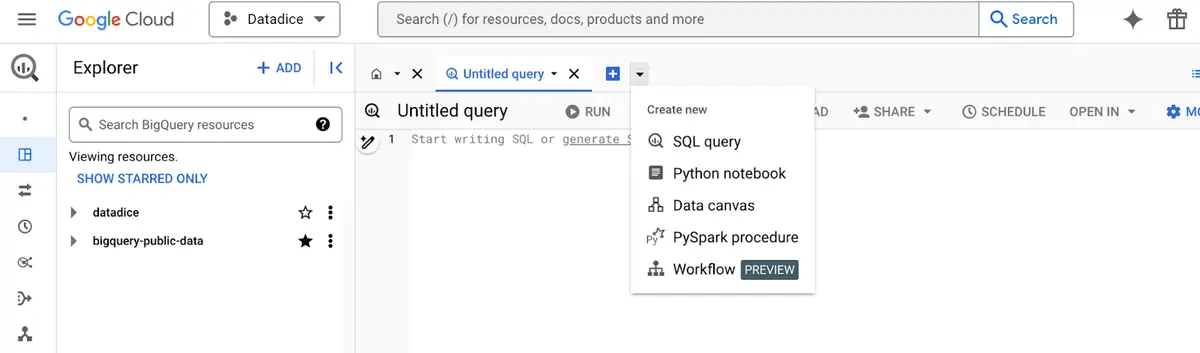
- Gehe zu BigQuery: Rufen Sie die BigQuery-Oberfläche in der Google Cloud Console auf. Wählen Sie im Editor-Bereich die Option „Workflow“ aus dem Dropdownmenü aus.
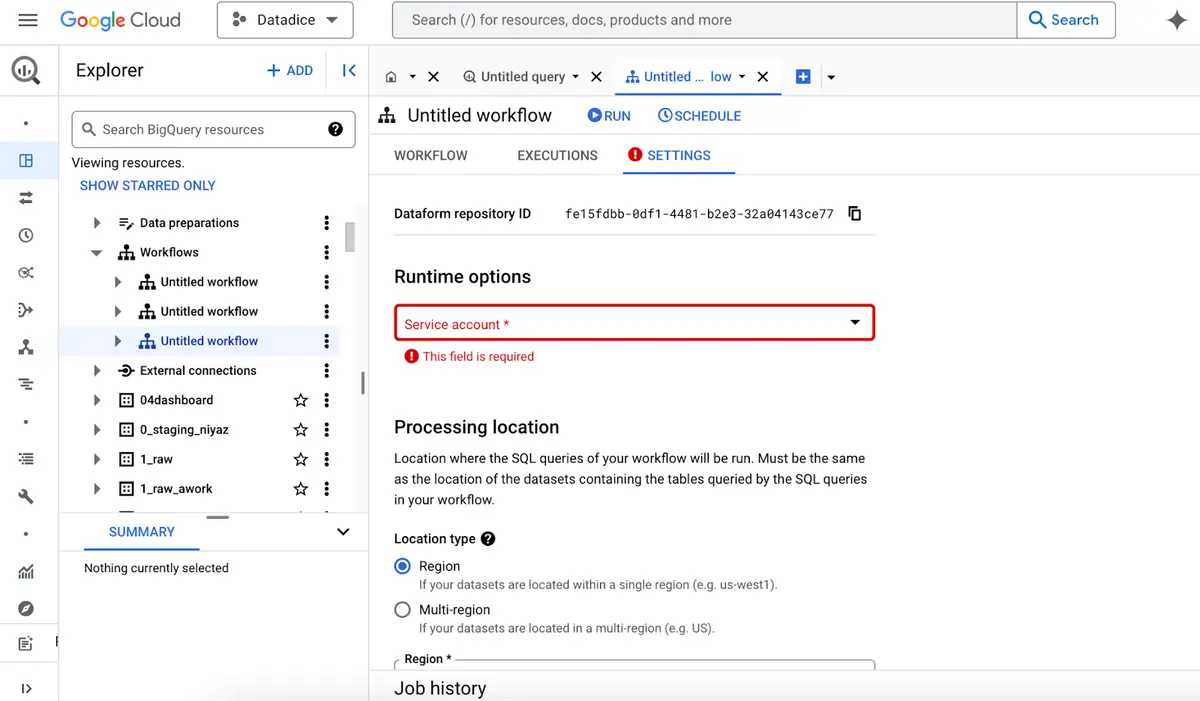
- Konfiguriere deinen Arbeitsablauf: Benennen Sie Ihren Arbeitsablauf, wählen Sie einen Dataform-Dienstkonto um es auszuführen und die Region auszuwählen, in der es verarbeitet werden soll.
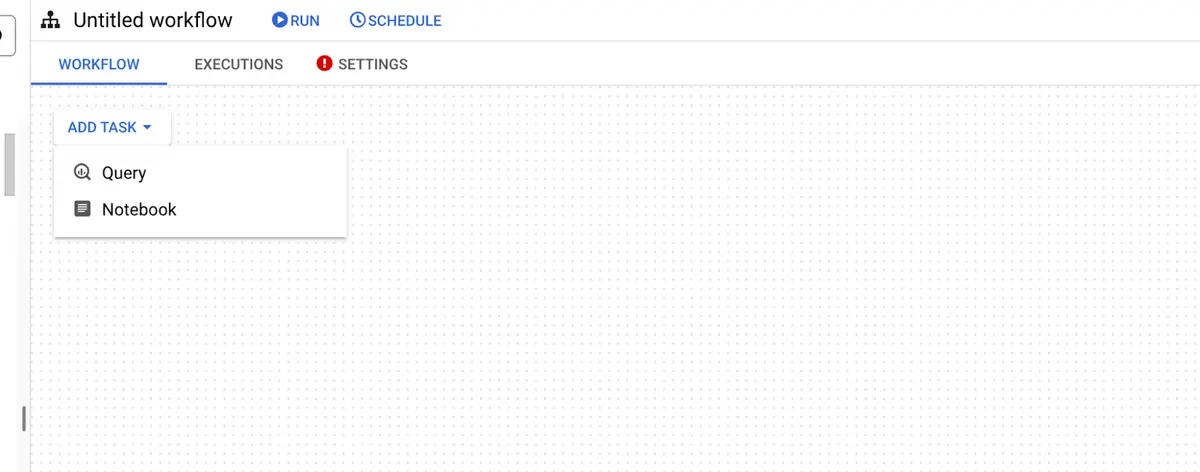
- Aufgaben hinzufügen: Sie können dem Workflow SQL-Abfragen oder Notizbücher hinzufügen. Jede Aufgabe kann von anderen abhängen, sodass Sie eine Ausführungsreihenfolge definieren können. Beispielsweise könnte eine Aufgabe Daten bereinigen und die nächste könnte diese Daten in ein maschinelles Lernmodell laden.
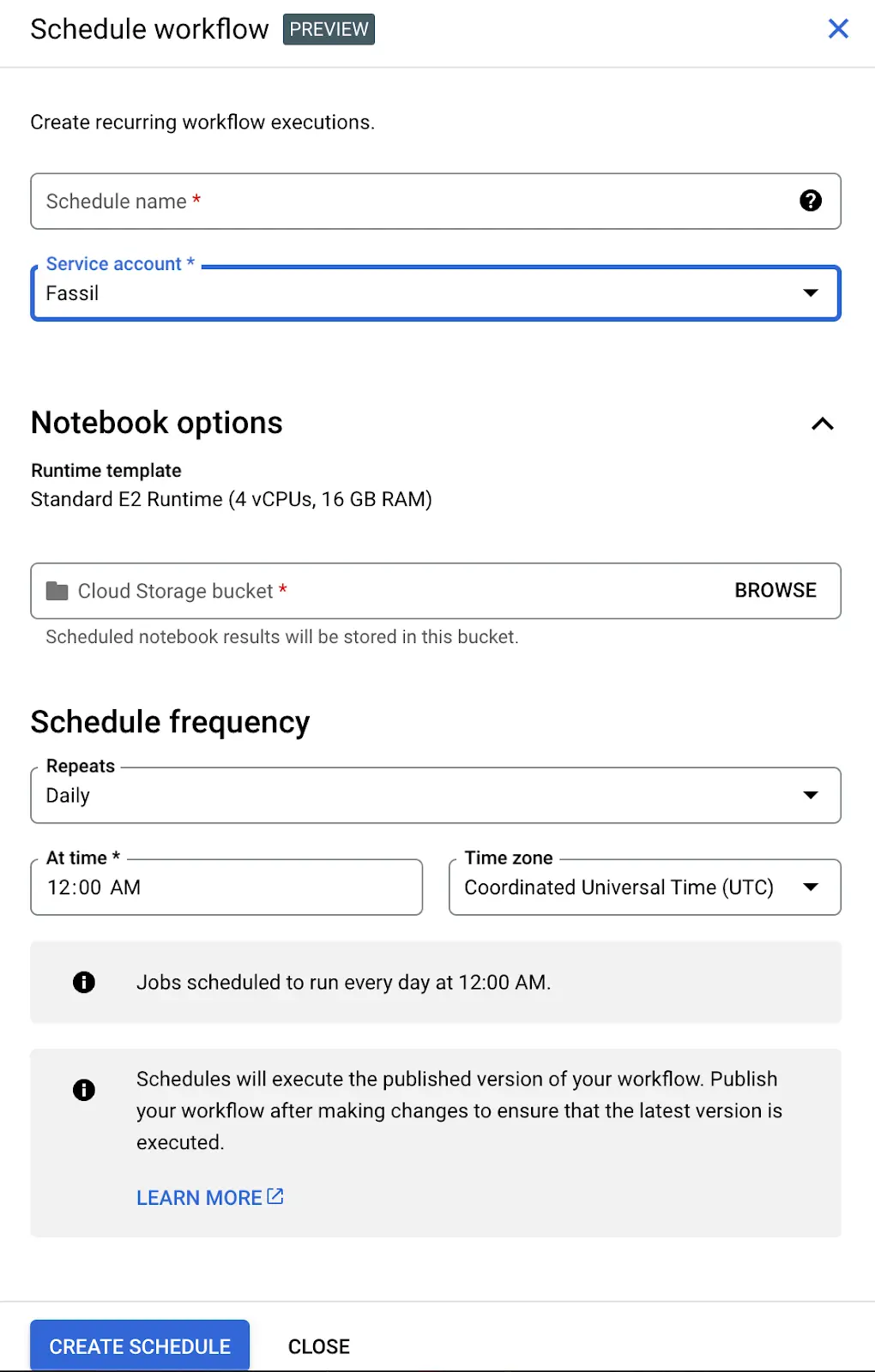
- Bereitstellen und Planen: Sobald Ihr Workflow eingerichtet ist, können Sie ihn bereitstellen und so planen, dass er automatisch in beliebigen Intervallen ausgeführt wird — täglich, wöchentlich oder in einer anderen für Sie geeigneten Häufigkeit.
- Überwachen und anpassen: Nach der Bereitstellung können Sie Ihre Aufgaben von der BigQuery-Konsole aus überwachen. Wenn etwas schief geht, z. B. ein Berechtigungsproblem, wird dies in den Protokollen angezeigt, sodass die Fehlerbehebung vereinfacht wird.
Example: Orchestrating a Simple Workflow in BigQuery
Let’s walk through an example of how BigQuery Workflows can be used to orchestrate a sequence of tasks. Suppose you want to process transactional data and then perform machine learning on the aggregated results to predict customer behavior. Here's how you could set up a workflow that orchestrates SQL queries and a Python notebook.
Task 1: Create and Aggregate Transactional Data Using SQL
First, create a table that contains dummy transactional data:
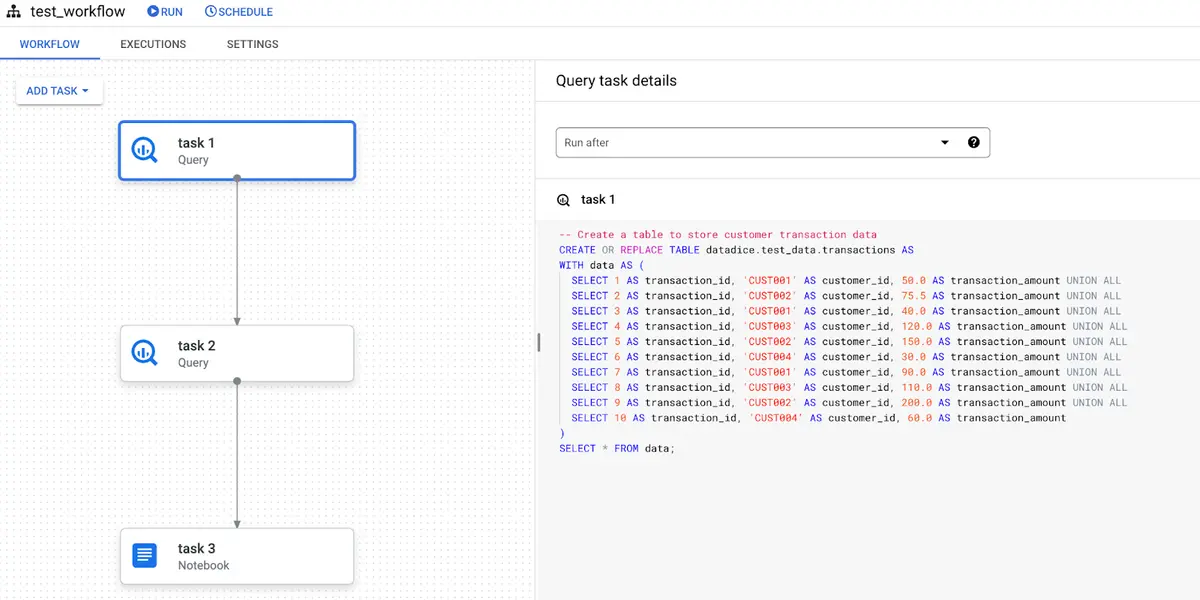
Task 2: aggregate the data by customer
This creates a customer_summary table that contains each customer's total transactions and revenue.
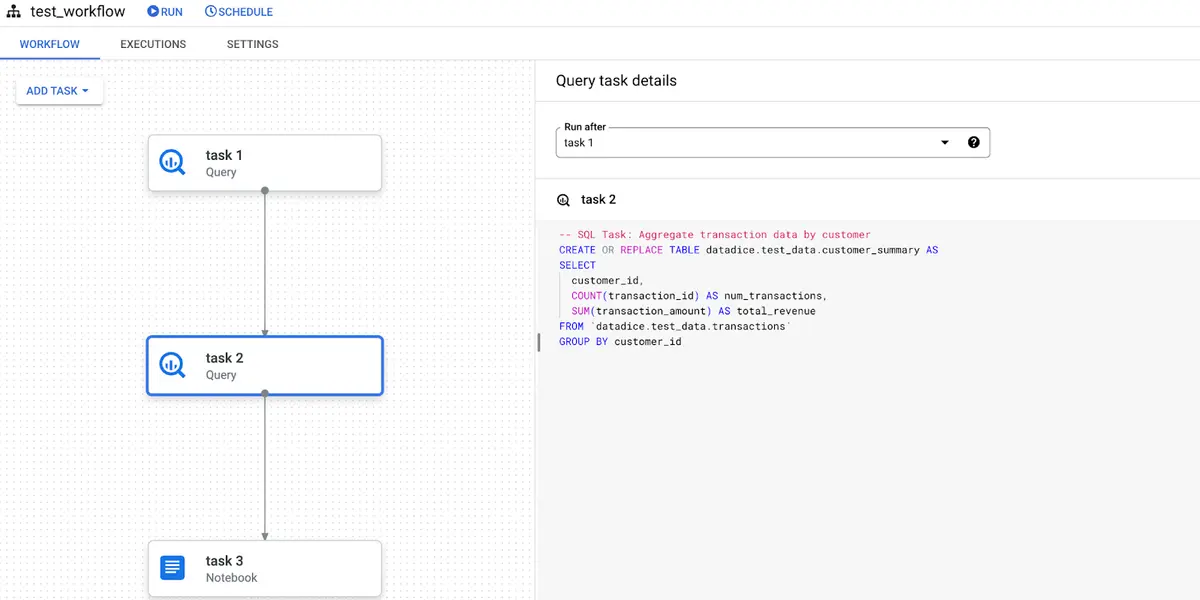
Task 3: Run a Machine Learning Model in a Python Notebook
This Python notebook takes the customer_summary data as input and uses a linear regression model to predict customer revenue based on the number of transactions. The results will be stored in the Cloud Storage bucket tied to the workflow.
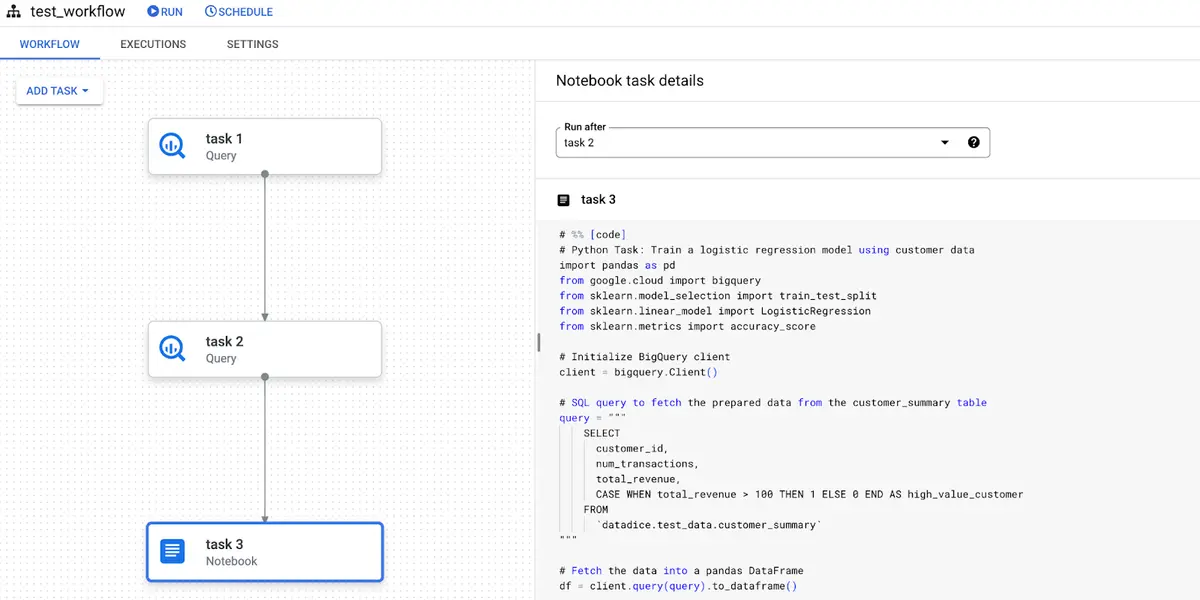
Using BigQuery Workflows, you can schedule these steps in sequence:
- SQL-Abfrage: Erstellen und aggregieren Sie zunächst die Transaktionsdaten.
- Python-Notizbuch: Nachdem die SQL-Aufgaben abgeschlossen sind, führen Sie das Notebook aus, um Vorhersagen für maschinelles Lernen durchzuführen.
This orchestration ensures that data is processed and analyzed efficiently without manual intervention. You can run the workflow on a schedule (e.g., daily or weekly) to continuously update your predictions as new transactions are processed.
Observe Workflows in the Orchestration
In the new Orchestration menu in BigQuery, you can see the workflow executions next to the Dataform executions.
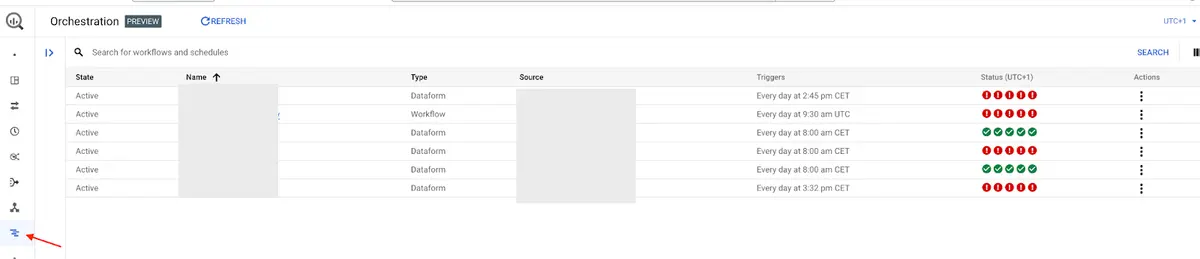
There you can click on the corresponding Workflows to look into the details and if they ran successfully the last 5 times.
The Advantages of BigQuery Workflows
- Visuelle Oberfläche: Einer der größten Vorteile von BigQuery Workflows ist die visuelle Oberfläche. Anstatt sich mit Code zu beschäftigen, können Sie Ihre Datenpipelines verwalten, indem Sie Aufgaben per Drag-and-Drop verschieben. Das ist besonders hilfreich, um die Abhängigkeiten zwischen Aufgaben auf einen Blick zu erkennen.
- Keine Zeitpläne mehr erraten: Bisher mussten Sie möglicherweise abschätzen, wie lange eine Abfrage dauern würde, bevor Sie die nächste planen konnten. Mit BigQuery-Workflows können Sie Abhängigkeiten zwischen Aufgaben festlegen, sodass eine Aufgabe erst ausgeführt wird, nachdem die vorherige Aufgabe abgeschlossen ist. Dadurch wird sichergestellt, dass alles reibungslos und ohne Verzögerungen abläuft.
- Integrierte Terminplanung: Die von Dataform betriebene Planungs-Engine übernimmt das Timing von Aufgaben automatisch. Egal, ob Sie eine einzelne Abfrage ausführen oder eine mehrstufige Pipeline orchestrieren, alles wird in der richtigen Reihenfolge und pünktlich ausgeführt.
- Zentralisierte Überwachung: Workflows verfügen über integrierte Protokolle zur Verfolgung des Fortschritts. Sie können Aufgaben ganz einfach überwachen, Fehler beheben und sogar die Ausgabe Ihrer Notizbücher in einsehen Cloud-Speicher.
- Kosteneffektiv: BigQuery Workflows kosten keine zusätzlichen Kosten. Sie zahlen nur für die üblichen Rechen- und Speicherkosten von BigQuery. Das macht BigQuery zu einer kostengünstigen Ergänzung Ihres Daten-Toolsets.
The Disadvantages of BigQuery Workflows
As promising as BigQuery Workflows is, there are some limitations:
- New Assets Only: You can’t import existing queries or notebooks into a workflow. Every task has to be created from scratch within the workflow interface.
- No Workflow Sharing: Unlike other tools, you can’t easily share a specific workflow with other users. Only those with the Dataform Admin role can access and modify workflows, which might slow down collaboration in larger teams.
- Fixed Region: When creating a workflow, you have to select a processing region, and this choice is permanent. If your data storage needs change, you’ll have to create a new workflow from scratch.
- No Code Versioning: There is no repository saving the code of the Workflow, which leads to no centralized place for the implementation and no advanced saving mechanisms like commits and no revert of changes.
- Preview Mode: Since this is a preview feature, some bugs or limitations in support are expected. It also means that future functionality is likely to expand, but the current tool may feel limited compared to mature alternatives like Composer.
How do BigQuery Workflows Compare to Dataform?
BigQuery Workflows is built on Dataform, a tool already used by many data teams for managing complex data transformations. However, while Dataform requires coding knowledge and is more suited for advanced users, BigQuery Workflows aims to be a simpler, no-code option that anyone can use.
So, why introduce BigQuery Workflows in addition to Dataform? The answer lies in accessibility. Dataform is excellent for complex projects where teams need full control over their data pipelines and advanced customizations. However, not every team needs that level of complexity. For day-to-day operations like running scheduled queries or orchestrating basic tasks, BigQuery Workflows offers a much easier solution. It strikes a balance between usability and power, making it ideal for businesses that need a simple, visual tool but still want to automate processes efficiently.
In the future, there’s even potential for BigQuery Workflows to expand to other types of assets or even integrate with Composer for more complex workflows.
Conclusion
BigQuery Workflows is a valuable addition to the BigQuery platform, especially for users looking for a simple way to manage and automate their data pipelines. With its intuitive interface, built-in scheduling, and seamless integration with BigQuery, it’s an easy-to-use tool that addresses common pain points in data orchestration.
Whether you're a data analyst managing regular reports or an engineer automating a machine learning pipeline, BigQuery Workflows can help you streamline your operations with less effort. As Google continues to develop this tool, we can expect even more features and integrations to make it even more powerful.
If you’re already using BigQuery, now’s a great time to explore this new feature and see how it can simplify your data processes.
More to read
If you enjoyed this blog, you'll love these too! Dive into more captivating content:
Upgrade Your ls Command to eza
Latest Updates on Google Data Analytics
Your AI Companion in the Google Cloud
Awakening the Data Messenger by Integrating BigQuery with Slack
Further Links
Check out our LinkedIn account, to get insights into our daily working life and get important updates about BigQuery, Data Studio, and marketing analytics.
We also started with our own YouTube channel. We talk about important DWH, BigQuery, Data Studio, and many more topics. Check out the channel here.
If you want to learn more about using Google Data Studio and taking it to the next level in combination with BigQuery, check out our Udemy course here.
If you are looking for help setting up a modern and cost-efficient data warehouse or analytical dashboard, email us at hello@datadice.io and we will schedule a call.